What Claude Ultracode does and when to leave it off
Claude Code's Ultracode turns one prompt into a workflow of many agents. It went live May 28 and became its own switch on Sept. 28.
The decision it puts on your desk
Keep Ultracode off for routine work and use it only for one big job, and test that job on one path first with your model set, then turn it off when it ends. Start in 7 days.
Ultracode went live on May 28, 2026 with Opus 4.8. It is the switch that turns Claude Code's new workflow system on.
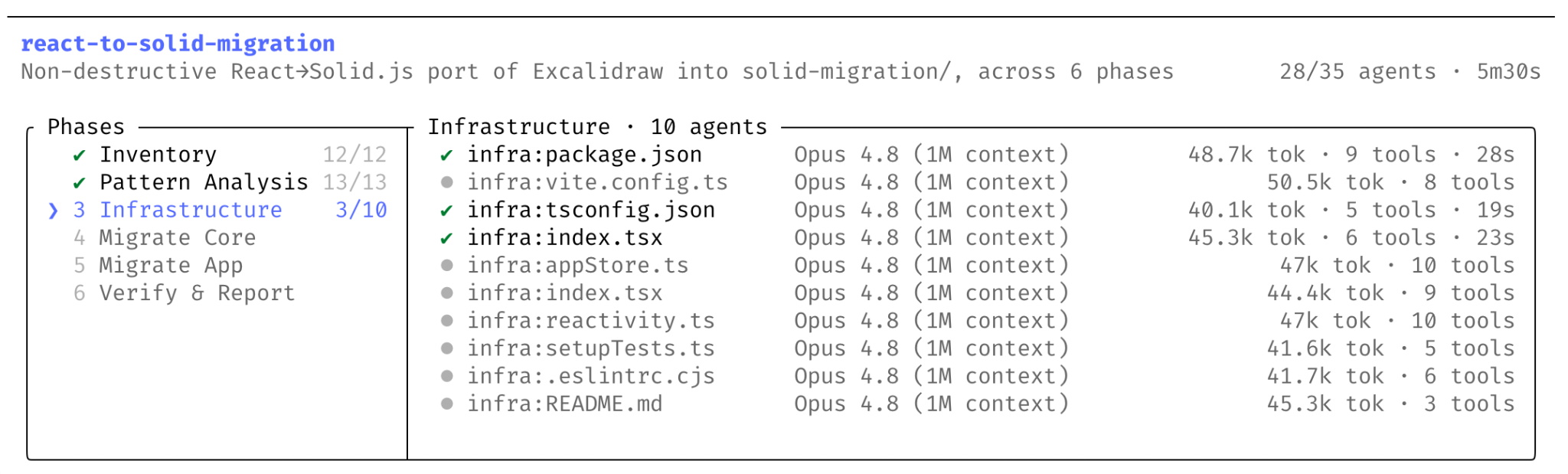
Ultracode is not a model and not a plan. Ultra is a Claude subscription tier at $200 per month. Ultracode is a switch inside Claude Code. It lives on every paid Claude plan. It also lives on the Anthropic API, on Amazon Bedrock, on Google Cloud's Agent Platform, and on Microsoft Foundry.
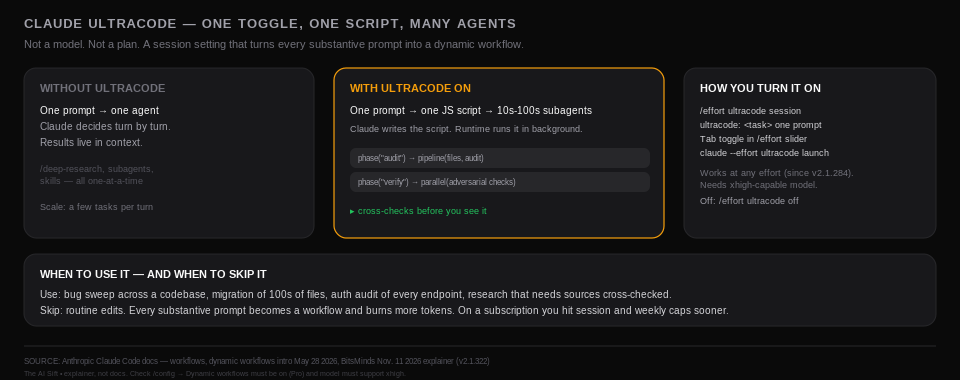
Toggle routes and session scope
There are four ways to turn Ultracode on. Each covers a different scope of work.
The session route sets auto orchestration for the whole session. Run /effort ultracode at the prompt. Or open the /effort slider, press Tab to flip the switch and press Enter to apply it. Since v2.1.284 on Sept. 28, 2026, the toggle is its own switch that works at any effort level. Before that release it forced the session to xhigh, and picking another level switched it off. Launching with claude --effort ultracode still sets both at once. To turn the toggle off, run /effort ultracode off. In VS Code and the Desktop app the switch lives in the model picker under Effort. VS is Visual Studio.
The per-task route keeps the session as is and runs one prompt as a workflow. Put the keyword in the prompt, as in ultracode: audit every API endpoint under src/routes for missing auth checks. Or ask in plain words such as "use a workflow" or "run a workflow." Claude Code highlights the keyword in the typed prompt. It writes a script for that one task. The keyword counts only in a prompt a person types. That includes the interactive prompt, an IDE panel, and a Remote Control or Agent SDK app that marks the input as human. IDE is integrated development environment. SDK is Software Development Kit. The keyword does not fire from claude -p, scheduled tasks, or webhook payloads.
The every-session route pins the choice in a settings file. Set "ultracode": true under a settings key and every session starts with the toggle on. The docs advise flipping it off with /effort ultracode off when the work turns routine.
Under the hood the pattern is the same whichever route is used. Claude writes a plain JavaScript script with phases. JS is JavaScript. A runtime runs the script in the background while the session stays open. The script keeps the loop, the branching, and the results in its own vars, so the main chat holds only the final answer. That is why a workflow can run far more agents than one chat could. It can also apply a quality pattern instead of just adding hands. One set of agents can audit findings. Another can draft a plan from several angles and vote. Claims that fail the cross-check are cut before the report lands.
Cost, caps, and availability checks
With Ultracode on, Claude decides when a prompt deserves a workflow. A single request can turn into several workflows in a row. One maps the code, one makes the change, one checks it. Every run draws on plan use and rate limits. Docs warn that a session with Ultracode on hits a limit sooner than the same work with it off. They advise a test on a small slice first, such as one folder or a narrow question.
Flipping the toggle also lifts three checks by design. The "Large workflow" note no longer shows while Ultracode is on. It shows when a run plans more than 25 agents or 1.5 million tokens. The at-once cap is not enforced for agents Claude spawns with the Agent tool. In auto mode the docs treat the toggle as consent, so the first-run check is skipped. Hard caps still hold. The default is at most 16 agents at once and 1,000 agents per run, and the cap can be set from 1 to 256.
"The docs treat it as consent to large runs," BitsMinds said in its November explainer of the September change, noting that the rest of the cost levers stay in force.
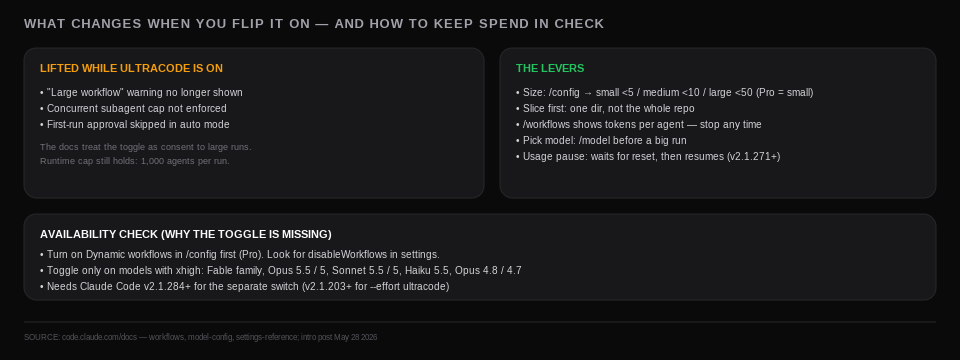
The levers that keep spend in check live in /config. The main one is Dynamic workflow size. It sets a guide, not a cap. Small aims for fewer than 5 agents. Medium aims for fewer than 10 and is the default. Large aims for fewer than 50. Pro defaults to small since Sept. 14.
The /workflows view shows each agent's token use and time. Any run can be stopped, paused, resumed, or saved as a /<name> command for reuse. A saved workflow can take input through an args global, so the same audit can run on different paths. Agents use the session's permission rules and sandboxing, so adding the tools they will need to an allow list before a long run avoids stalls. Since v2.1.271 a run that hits a limit waits for the reset. It then resumes on its own.
Availability has two gates. Workflows must be on before Ultracode appears. On Pro that means switching on the Dynamic workflows row in /config once. The toggle also shows only on models that support xhigh effort. That effort level is extra-high reasoning. As of v2.1.322 the list spans every Fable model including Fable 5.2, plus Opus 5.5, Sonnet 5.5, Haiku 5.5, Opus 5, Sonnet 5, Opus 4.8 and Opus 4.7, but not Opus 4.6 or Sonnet 4.6. The single toggle needs Claude Code v2.1.284 or later, and claude --effort ultracode needs v2.1.203 or later.
For a quick hands-on, Anthropic ships /deep-research as the built-in workflow. Call it with a research question. It fans out web searches across angles, fetches and cross-checks sources, drops claims that do not survive, and returns a cited report.
Sources